
The Skill
Data cleansing is the process of detecting and correcting (or removing) corrupt or inaccurate records from a dataset. For physical and infrastructure assets, this data often comes from a variety of sources, including manual inspections, sensor readings, and maintenance logs.
This skill involves systematically reviewing data to identify issues like missing values, inconsistent formatting, typos, and out-of-range measurements. You will then apply specific techniques to fix these problems, transforming a raw, messy dataset into a reliable source for analysis and decision-making.
Why Is This Skill Important?
In asset management, all major decisions—from scheduling preventive maintenance to planning multi-million dollar capital replacements—depend on the quality of your data. Poor data quality can lead to incorrect condition assessments, unexpected asset failures, safety incidents, and wasted resources.
Mastering data cleansing ensures that your analyses are built on a solid foundation. It allows your organization to trust its data, enabling accurate performance forecasting, effective predictive maintenance strategies, and confident, evidence-based investment planning. This skill is not just about tidiness; it is a fundamental requirement for responsible and effective asset management.
Your Task
Your task is to take a raw dataset of condition monitoring data for a series of water pumps and prepare it for analysis. You will receive a data file containing several common errors. You must identify and correct these issues to produce a clean, standardized, and reliable dataset. Your final output should be a summary of the changes you made and the rationale for each correction.
Your Cleansing Workflow
Follow these high-level steps to complete the task:
- Review the Data: First, inspect the provided dataset to understand its structure and identify potential errors.
- Identify Issues: Systematically locate all missing values, formatting inconsistencies, typos, and invalid data points.
- Apply Corrections: Use appropriate techniques to handle each identified issue.
- Document Your Process: Create a brief report detailing the errors you found and the specific actions you took to correct them.
Resources and Data
You will use the following simulated maintenance memo and the linked dataset to complete your task. The memo provides context for the data, and the dataset contains the raw information you need to cleanse.
Key Document: Maintenance Data Review Memo
Q3 Raw Pump Condition Data
| Asset ID | Inspection Date | Operating Temp C | Vibration mm s | Asset Type | Inspector |
|---|---|---|---|---|---|
| PMP-101 | 2023-11-01 | 55.2 | 2.1 | Centrifugal | John Smith |
| PMP-102 | 11/02/2023 | None | 3.5 | Submersible | A. Davis |
| PMP-103 | 2023-11-03 | -999 | 1.8 | centrifugal | Bob Williams |
| PMP-104 | 11/04/2023 | 61.5 | 4.2 | Centrifgal | J. Smith |
| PMP-105 | 2023-11-05 | 75.1 | 500.0 | Centrifugal | Alice Davis |
| PMP-106 | 11/06/2023 | 68.3 | 2.9 | Diaphragm | Bob Williams |
| PMP-107 | 2023-11-07 | None | 8.1 | centrifugal | John Smith |
| PMP-108 | 11/08/2023 | -999 | 2.2 | Submersible | A. Davis |
| PMP-109 | 2023-11-09 | 59.9 | 3.3 | Centrifugal | J. Smith |
| PMP-110 | 2023-11-10 | 62.0 | 11.5 | Submersble | Alice Davis |
| PMP-111 | 11/11/2023 | None | 4.8 | Diaphragm | Bob Williams |
| PMP-112 | 2023-11-12 | 81.2 | 14.2 | Centrifgal | John Smith |
| PMP-113 | 11/13/2023 | 54.7 | 1.9 | Centrifugal | A. Davis |
| PMP-114 | 2023-11-14 | 70.1 | 5.6 | submersible | J. Smith |
| PMP-115 | 11/15/2023 | 66.8 | 3.1 | Diaphragm | Alice Davis |
Detailed Steps
Follow this structured process to cleanse the asset condition data.
Step 1: Initial Data Inspection
Before making any changes, get familiar with the data. Open the piam-630-s-5-raw-pump-data.csv file. Look at the column headers and a sample of the rows. Your goal is to spot obvious problems.
- Are there blank cells where you expect data?
- Do the date formats look consistent?
- Are there any strange or nonsensical values?
- Is the text in columns like
AssetTypestandardized?
First Pass Observation
A quick scan often reveals the most common data quality issues. Don't try to fix anything yet. Simply make a mental or written list of the problems you see. This initial review helps you form a plan of attack.
Step 2: Handling Missing and Invalid Values
Your dataset contains missing temperature readings and placeholder error codes (-999). You must decide how to handle them.
Imputation
For the OperatingTemp_C column:
1. Identify: Locate all rows where OperatingTemp_C is blank or -999.
2. Strategy: A reasonable strategy for sensor data is to replace these missing values with the average (mean) of all the valid temperature readings. This preserves the overall statistical properties of the data.
3. Execute: Calculate the mean of the OperatingTemp_C column, excluding the blank and -999 values. Replace each missing or invalid entry with this calculated mean.
For the extreme Vibration_mm_s value (e.g., 500), this is likely an error and not a real measurement. Since it's a single outlier, you could either remove the entire row or, similar to the temperature, replace it with the mean or median of the other vibration readings.
Step 3: Standardizing Categorical Data
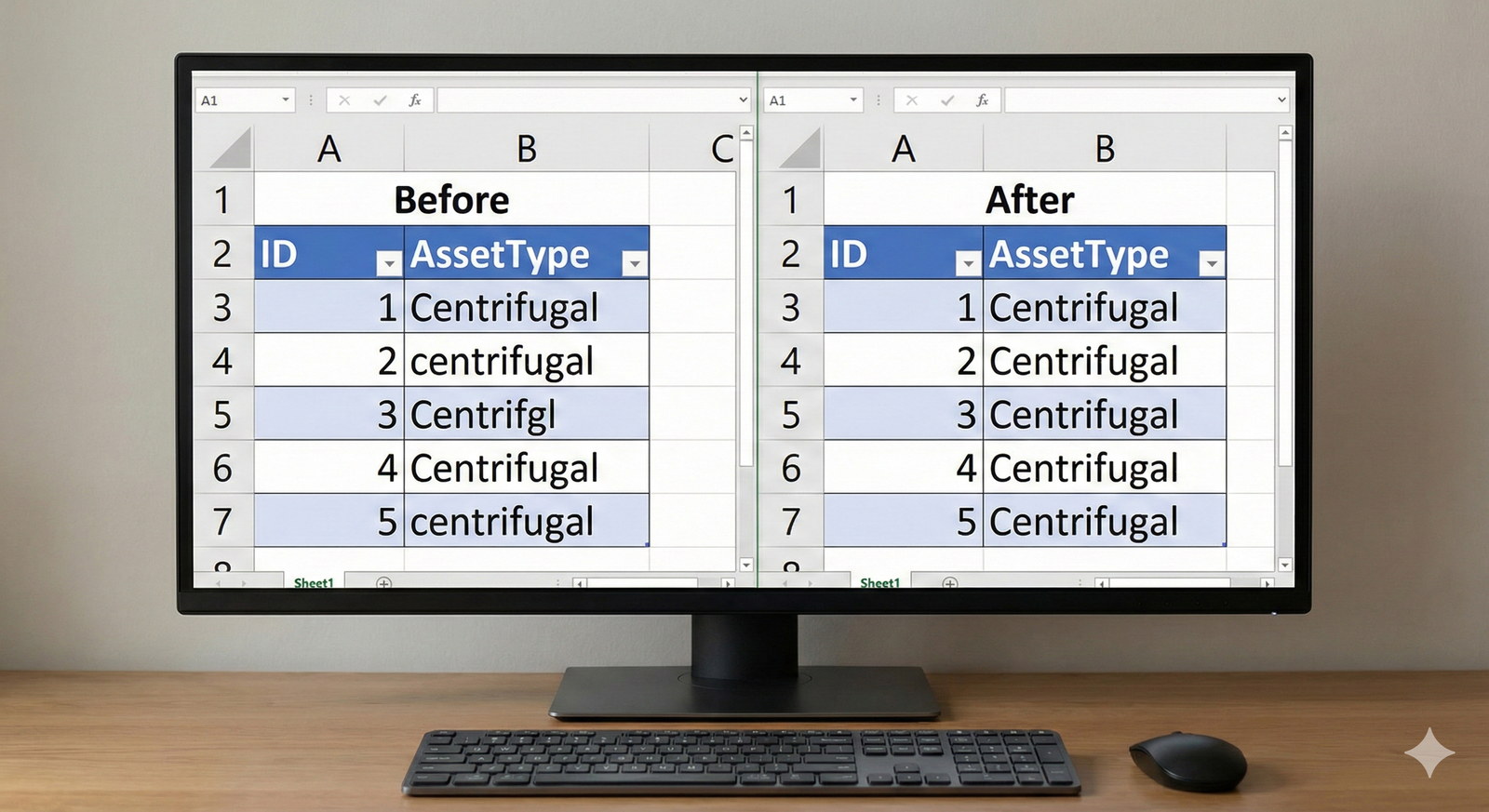
The AssetType column contains variations like 'Centrifugal', 'centrifugal', and 'Centrifgl'. For a computer to analyze this data correctly, these must be identical.
- Identify: List all unique values in the
AssetTypecolumn. - Strategy: Choose a single, standard format.
Centrifugalis a good choice. - Execute: Replace all variations with the chosen standard format. This is often done with a "find and replace" function. The same logic applies to the
Inspectorcolumn, where 'J. Smith' and 'John Smith' should be standardized to one format, such as 'John Smith'.
Step 4: Unifying Date Formats
The InspectionDate column has mixed formats (YYYY-MM-DD and MM/DD/YYYY). This will cause errors in any time-based analysis.
📊 View Diagram: Date Standardization Process
- Identify: Scan the
InspectionDatecolumn to confirm the different formats present. - Strategy: Select a single, unambiguous international standard.
YYYY-MM-DDis the best practice. - Execute: Convert all dates that are in the
MM/DD/YYYYformat to theYYYY-MM-DDformat.
Step 5: Documenting Your Changes
The final and most critical step is to document your work. Create a simple log of the changes you made. This ensures transparency and allows others to understand how the raw data was transformed.
The Data Cleansing Log
Never cleanse data without documenting your steps. Your log should be clear and concise. For example:
- Column
OperatingTemp_C: Replaced 3 null values and 2 '-999' values with the column mean of 55.2°C. - Column
AssetType: Standardized all entries to 'Centrifugal'. - Column
InspectionDate: Converted all dates to 'YYYY-MM-DD' format.
An Expert Response
Expert Sample Response
This is an example of a high-quality response. Your own response may be slightly different depending on the specific choices you made (e.g., using the median instead of the mean), and that's perfectly acceptable. The key is to justify your decisions clearly.
Data Cleansing Report: Q3 Pump Condition Data
This report summarizes the data cleansing process performed on the piam-630-s-5-raw-pump-data.csv file. The objective was to prepare the dataset for lifecycle analysis.
1. Summary of Issues Identified:
An initial review of the raw data revealed the following quality issues:
* Missing Data: The OperatingTemp_C column contained several blank entries.
* Invalid Data: The OperatingTemp_C column contained -999 as an error code, and the Vibration_mm_s column contained one extreme outlier (500 mm/s).
* Inconsistent Categorical Data: The AssetType and Inspector columns contained variations in capitalization, spelling, and format.
* Inconsistent Formatting: The InspectionDate column used multiple date formats.
2. Cleansing Actions Performed:
The following corrective actions were taken:
- Handled Missing/Invalid Temperatures: The mean of all valid
OperatingTemp_Cvalues was calculated. All blank cells and cells containing-999were replaced with this mean value to maintain data integrity without removing rows. - Corrected Invalid Vibration Reading: The outlier value of 500 mm/s in the
Vibration_mm_scolumn was deemed a measurement error. It was replaced with the median value of the column to avoid skewing the data. - Standardized Asset Types: All variations in the
AssetTypecolumn (e.g., 'centrifugal', 'Centrifgl') were standardized to the single format 'Centrifugal'. - Standardized Inspector Names: Inspector names were unified to a 'First Last' format (e.g., 'J. Smith' became 'John Smith').
- Unified Date Formats: All dates in the
InspectionDatecolumn were converted to the standardYYYY-MM-DDformat.
The resulting dataset is now internally consistent, complete, and suitable for further analysis.
Assess Yourself
Evaluate Your Work
Use the following criteria to assess the quality and completeness of your data cleansing report. Compare your work against the expert response to identify areas for improvement.
- Error Identification: Did you successfully identify all the major data quality issues, including missing values, invalid entries, inconsistencies, and formatting problems?
- Problem Resolution: Did you apply an appropriate and justifiable technique to resolve each identified issue?
- Data Integrity: Is your final, cleansed dataset free from the original errors and ready for a data analyst to use without further correction?
- Clarity of Documentation: Is your summary report clear, concise, and does it accurately describe the actions you took and why you took them?
Learning Progress
By completing this activity, you have practiced the essential skill of performing data cleansing and preparation. You have successfully transformed a raw, error-prone dataset into a reliable and analysis-ready source of information, a core competency for any asset management professional.
Next Steps
Excellent work. You have successfully practiced a critical technical skill. Please navigate back to the course to continue your learning journey.
